Defines behavior of TRichView when drawn in 256-color mode display.
type
TRVPaletteAction =
(rvpaDoNothing, rvpaAssignPalette,
rvpaCreateCopies, rvpaCreateCopiesEx);
property DoInPaletteMode: TRVPaletteAction.
Note: TRVPaletteAction is declared in RVScroll unit.
This property affects only displaying in-256 color mode and does nothing in highcolor and truecolor modes.
This property may be considered obsolete since 256-color mode is rarely used.
Mode |
Meaning |
|---|---|
rvpaDoNothing |
RichView does nothing with palette. Use if you have no pictures in RichView, or all pictures are in VGA 16-color palette. |
rvpaAssignPalette |
When working in 256-color mode, RichView creates palette and assigns it to all pictures (including background). This will affect all pictures that already in RichView, and all pictures that will be inserted later (when in 256-color mode). This is also not very good option, because pictures lose their quality, and it can't be restored when switching to highcolor/truecolor mode. Output to RVF, HTML, clipboard, printer will lose quality of pictures. So use this option if you want only to display document. |
rvpaCreateCopies |
(default and preferred option) In 256-color mode, RichView creates copies of all pictures (including background) and assign palette to them. This will affect all pictures that already in RichView, and all pictures that will be inserted later (when in 256-color mode). This work is absolutely "transparent" for you, you will work with source pictures that remain unchanged. |
rvpaCreateCopiesEx |
For future versions, do not use (idea: copies of pictures may be created not in format of source picture, but in some better format) |
Notes:
1.If you have other controls on form which also change palette (such as TImage, or buttons with multicolor glyphs), you can not achieve required results.
2.If you use multicolor hotspots or bullets in RichView, it's recommended to have two sets of them: 16color for 16- and 256-color modes, and multicolor for others.
3.RichView can't change palette of bitmaps inside metafiles; do not use TMetafile containing multicolor bitmaps in 256-color mode.
4.RichView can't update information about palette when user switches color resolution without restarting Windows. Please do it yourself, as it's shown below.
5.If you create RichViews, RichViewEdits, RVPrintPreviews, RVPrints at run-time (such as MyRichView := TRichView.Create(Self)), you need to call UpdatePaletteInfo methods of such controls after you have created them.
In interface section:
procedure WMDisplayChange(var Message: TWMDisplayChange);
message WM_DISPLAYCHANGE;
In implementation:
procedure TMyForm.WMDisplayChange(var Message: TWMDisplayChange);
begin
// Call UpdatePaletteInfo methods of all your
// RichViews, RichViewEdits, and RVPrints (if you use print preview)
// for example:
MyRichViewEdit.UpdatePaletteInfo;
MyRVPrint.UpdatePaletteInfo;
end;
Default value:
rvpaCreateCopies
(or rvpaDoNothing in Delphi 2 and C++Builder 1)
TRichView uses the palette displayed below (the same as Microsoft Internet Explorer uses):
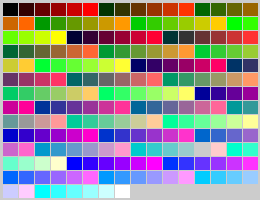
If you need to use your own palette, let me know, I will create a public property for it. Now you can override the protected dynamic method GenerateLogPalette (introduced in TRVScroller).
See also methods:
See also methods of TRVPrint: